
A customer emails four minutes after checkout: cancel my order, I typed my old address.
If you searched how to cancel an order in Shopify, the answer is short — open the order in your admin, click More actions, then Cancel order. Shopify's own documentation covers the refund, restock and notification options that come next (help.shopify.com, checked 27 August 2026).
Thirty seconds. The part worth your attention is that this customer never wanted to cancel. They wanted to fix a street number, and cancelling was the closest thing to a fix anyone had given them.
This post is about that second problem: why cancel requests pile up, and how to hand the customer the repair instead. If you want the broader setup, we've covered how self-serve order editing works separately.
When "how to cancel an order in Shopify" is really a fix request
Post-purchase support is repetitive in a very specific way. It comes down to the same handful of messages: wrong address, can I change the size?, I meant to order two, please cancel this.
Read that list again. Three of the four are repairs. Only the last one is a customer who has changed their mind about owning the product.
But the customer-facing side of Shopify has no repair button. A shopper can view an order; they can't open it and change a line. So when something is wrong, the lever within reach is cancellation, not repair — and someone on your team opens the admin and undoes an order that needed one field changed.
That's why a rising count of cancel requests usually isn't a cancellation problem. It's a no-self-serve-edit problem wearing a cancellation's clothes.
Put the fix above the cancel button
The answer isn't to make cancelling harder. It's to make sure that when a customer goes looking for the cancel button, the thing they actually wanted is sitting above it.
That's what letting customers edit their own orders does. Triom's order editing adds an Edit your order section to the Thank You page and the Order Status page, built from ten individual actions you switch on or off one at a time. If a customer doesn't see an action in their edit screen, it's because the matching toggle is off.
Cancel order is one of those ten, and it's on by default. The point isn't to bury it — most stores leave it on, because the cancellations that were going to happen anyway become self-serve instead of support tickets. The point is what surrounds it:
- Wrong size or color — Change variant handles it: size M to L, or red to blue.
- Wrong address — Change shipping address, the single most common one.
- Ordered the wrong thing — Replace products, for the customer who "ordered the wrong pattern".
- Meant to order one, not three — Change quantities, the second most common support request.
- Cart total feels too high — Change quantities down, or remove a line entirely.
You also control the running order. The actions are drag-and-drop, and the sequence you set on that page is the sequence customers see. A common arrangement puts Change shipping address first, Change quantities second and Cancel order third — so the two repairs that cover most of the inbox get read before the customer reaches the exit.
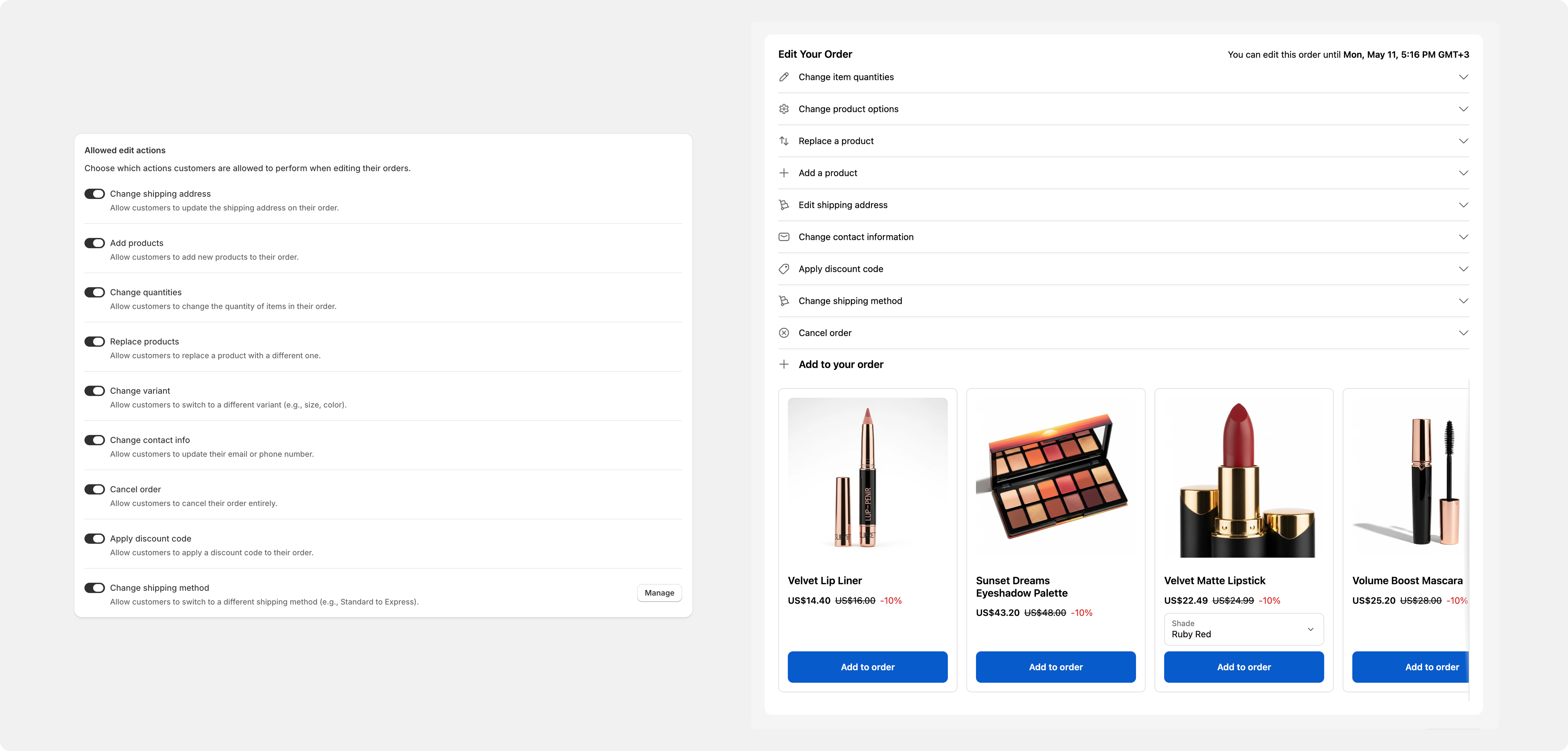
None of that is a trick. The customer who wants out still gets out in one click, without emailing anyone. The customer who only wanted a different size finds that option before they ask for something more drastic than they meant.
Stop the warehouse before it packs
Here's the failure that makes all of this moot. A fast-moving warehouse ships an order five minutes after checkout — and five minutes later the customer tries to fix the shipping address. That isn't an edit any more. It's a reship.
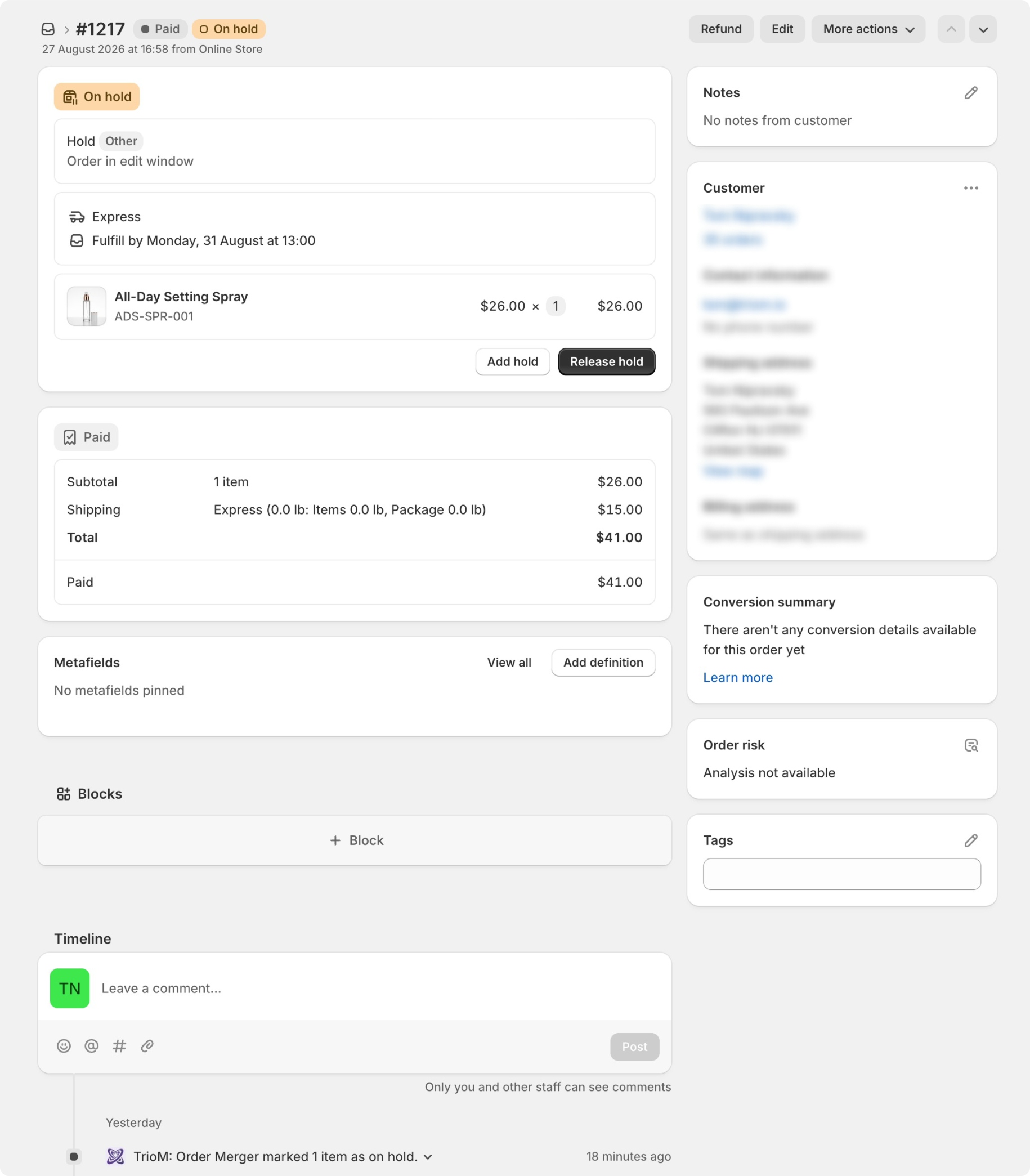
Triom handles it with a real Shopify fulfillment hold. Every eligible order is placed on hold the moment it comes in, with the reason "Order in edit window":
- Your team sees it in the admin. The order carries a fulfillment hold banner, so warehouse staff and 3PL integrations skip it.
- It releases itself. The hold lifts the instant the edit window closes, whether that's time running out or the customer finishing up.
- It's on by default. Nothing to build, nothing to maintain. Turn it off only if you have a reason to — a same-hour pick-and-pack operation where a hold costs more than it saves.
- You can tag the orders too. Switch on the optional
om:edit-order-holdtag and orders currently in their window become filterable in Shopify. The tag is removed automatically when the window closes.
The defaults are the point. A hold that's already running is a different thing from a hold that's on your to-do list.
Let them cut the cart instead of killing it
Not every "cancel" is all-or-nothing. Plenty are really I don't need three of these.
Reducing a quantity, or dropping a line by taking it to zero, counts as a downgrade rather than a cancellation. The edit finalizes with the difference refunded — to the original payment method by default, or to store credit if you'd rather keep it in the business. The order survives at a lower total instead of disappearing.
All of it runs inside a window you set:
- The window opens at checkout and closes when your time runs out or the order is fulfilled, whichever comes first. The default is 30 minutes — you set a number and a unit.
- Pick the length from your fulfillment speed. Fast-moving DTC does well at 15–30 minutes, standard ecommerce at 1–2 hours, slower or B2B operations at 1–3 days.
- Or leave it open until the order ships. Turn on "Keep edit window open until order is fulfilled" and the countdown becomes an Until fulfilled badge.
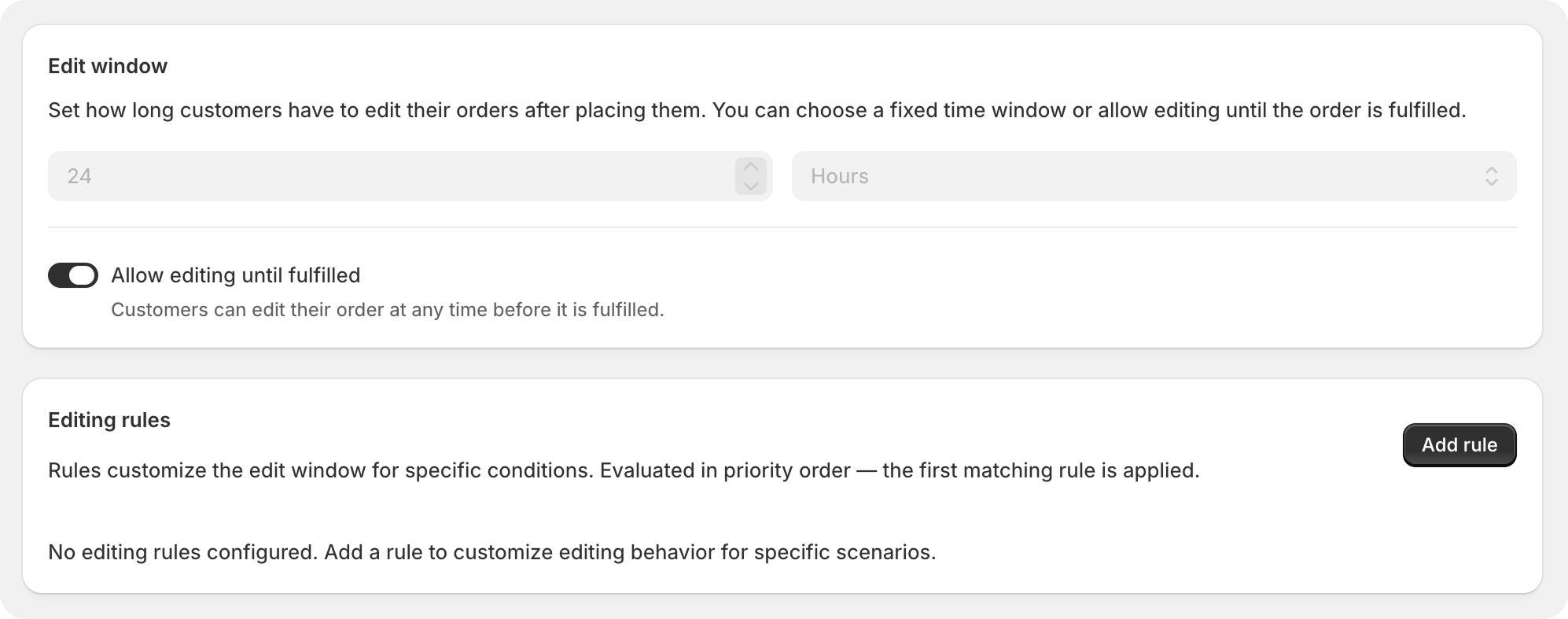
Even on that last setting, the window shuts the moment the order is marked fulfilled. Customers cannot edit an order that has already shipped, and nothing here reopens something Shopify has closed.
When the window ends, the Thank You block hides itself completely, and the Order Status block shows a single line: "This order cannot be edited."
Which orders should never be editable
Switching self-serve cancellation on across the board is the mistake to avoid. Some orders aren't yours to change:
- Marketplace orders — Amazon, eBay, Walmart, Facebook, TikTok Shop. The marketplace owns the fulfillment rules.
- Point of Sale — an in-store purchase isn't waiting on an edit window.
- Wholesale and B2B — contract-governed. Changes go through sales, not a Thank You page.
- Drop-shipped or 3PL-fulfilled lines — the partner already accepted the order, and a 3PL on a tight SLA bills for the change.
- Retail store pickup — the order is prepared instantly.
You exclude them by sales channel, fulfillment location, order tag or product tag. An order-level restriction hides the block on the Thank You page and replaces it with a single line on the Order Status page. A product-tag restriction works per line instead, so a bundled gift locks while the rest of the order stays editable.
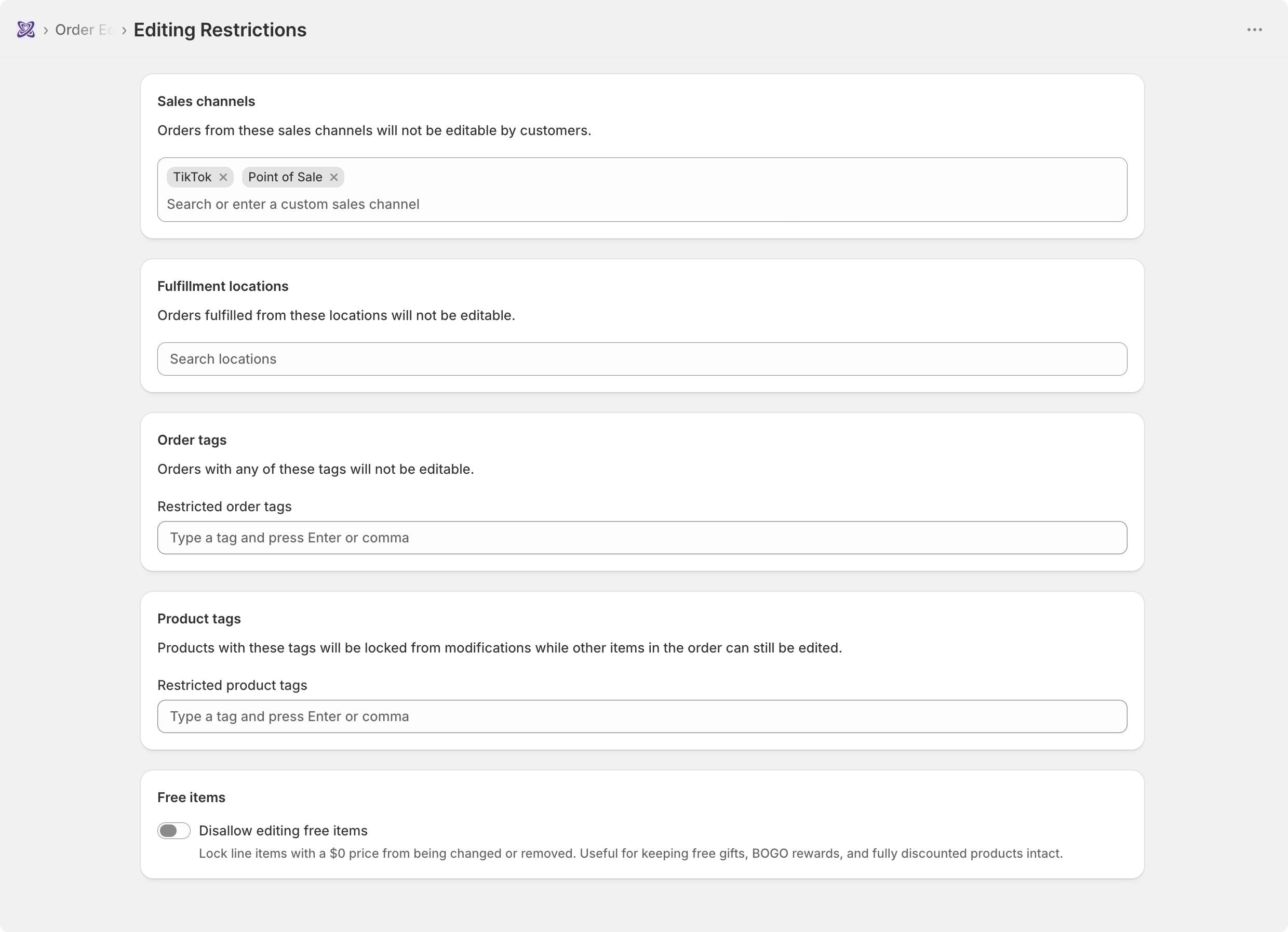
When a blanket rule is too blunt, editing rules cover the per-segment cases. The documented example is international orders: they can change contact details and cancel, but not change the address or add products.
Where this leaves your inbox
You'll still get cancellations, and you should. Some customers genuinely don't want the thing, and those should be easy — through Shopify's admin flow, or through the customer's own edit screen, with nobody writing an email about it.
What changes is everything else. The wrong sizes, the old addresses, the extra unit: those stop arriving as cancel requests, because there was somewhere better to click.
If that's the shape of your support inbox, see how order editing works or take a look at order editing app pricing.
Frequently asked questions
How do I cancel an order in Shopify? Open the order in your Shopify admin, click More actions, then Cancel order. Shopify's documentation covers the refund, restock and notification options that follow.
Can customers cancel their own Shopify orders? Not from Shopify's native order view — a shopper can see an order there, but not change a line on it. Cancel order is one of the ten editing actions Triom adds, and it's on by default.
How long can a customer still edit or cancel an order? For as long as the edit window is open. The default is 30 minutes from checkout, and it closes when your time runs out or the order is fulfilled, whichever comes first. Customers cannot edit an order that has already shipped.
Which orders shouldn't be self-serve cancellable? Marketplace orders, Point of Sale, wholesale and B2B, drop-shipped or 3PL-fulfilled lines, and retail store pickup. Exclude them by sales channel, fulfillment location, order tag or product tag.
