
A customer buys a hoodie. Ten minutes later they come back for the matching beanie. Now you've got two orders, going to the same person, at the same address, on the same day — and unless you do something about it, you're going to pick, pack, and ship them twice.
Multiply that across a busy week and "separate orders that should be one" quietly becomes one of the most avoidable costs in your store: double shipping labels, double packing time, and a customer who's now tracking two parcels and wondering why.
This guide covers why duplicate and separate orders happen, what merging actually does, and how to combine them into a single shipment without the manual admin grind.
Why customers end up with multiple orders
It's rarely carelessness. The usual causes are baked into how online shopping works:
- The afterthought. They checked out, then remembered one more thing. A second order is faster than trying to edit the first — because, as most shoppers discover, Shopify doesn't let them edit it anyway.
- The accidental double. The payment page hung, they refreshed or tapped "Pay" again, and two identical orders went through. Now they're asking, "Why do I have two orders when I only bought once?"
- The split cart. Something was out of stock, so they ordered the in-stock items now and the rest later.
- The repeat buyer. A regular places several orders across a few days and would love them to ship together.
From the customer's side it feels like a small thing. From your side, each of those orders is a separate fulfillment record heading for its own box.
What merging orders actually does
Merging takes two or more orders going to the same customer and combines them into a single order and a single shipment. Instead of two labels and two boxes, you fulfill once.
The wins are immediate and practical:
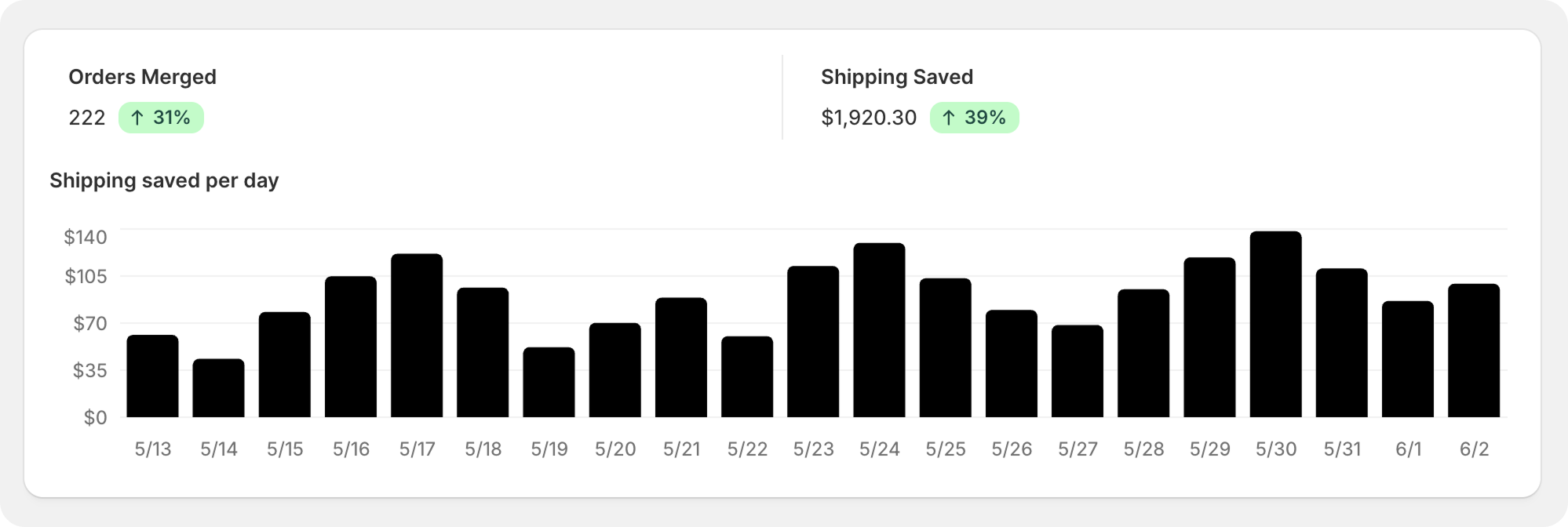
- Lower shipping cost. One parcel instead of two. On higher-volume stores, consolidating duplicates is one of the cleanest ways to trim fulfillment spend.
- Less warehouse work. One pick, one pack, one label. Your team isn't handling the same customer twice.
- A better unboxing. The customer gets everything together, in one delivery, instead of a confusing trickle of packages.
- Fewer "where's the rest?" tickets. One shipment means one tracking number to follow — not several.
It's the rare optimization that's better for your margins and better for the customer at the same time:
"We've had several customers reach out to tell us how much they appreciate multiple orders being combined and the extra shipping charges refunded. It's a customer service feature that sets us apart from our competitors." — EarthSpoke Farms
Why Shopify makes this harder than it should be
Here's the catch: Shopify has no native "merge orders" button.
If you want to combine two orders by hand, the workaround is clumsy. You typically:
- Edit one order to add the items from the other,
- Cancel and refund the duplicate,
- Manually reconcile the payments so your books still balance, and
- Hope you did it before either order was already fulfilled.
That's a lot of careful clicking for something that happens all the time. Do it under pressure during a busy sale and mistakes creep in — a refund missed here, an order shipped twice there. Most merchants either eat the cost of shipping separately or burn support time merging by hand. Neither is great.
What happens to tracking, refunds, and payments
These are the questions customers (and cautious merchants) ask most about merging, so it's worth being clear:
- Tracking numbers. Once orders are merged into one shipment, there's a single tracking number for the combined parcel. That's less confusing for the customer, not more — they follow one delivery instead of trying to reconcile two.
- Refunds and payments. When a duplicate is rolled into a primary order, the duplicate's charge needs to be handled cleanly — refunded or reconciled — so the customer is only paying for what they actually receive. This is the fiddly, error-prone part when done manually, and the part most worth automating.
- Shipping the customer already paid. If both orders were charged shipping, merging is also a chance to make it right — the customer shouldn't pay twice to ship to one address.
Handled properly, the customer's experience is simply: one order, one parcel, one charge, one tracking link.
How to combine orders on Shopify without the manual work
You've got three options, in rough order of effort:
1. Do nothing. Ship every order separately. Simple, but you pay for it in shipping and packing on every duplicate.
2. Merge by hand in the admin. Workable at low volume, but slow, and risky to get wrong on payments and timing.
3. Automate it. Let software spot mergeable orders and combine them for you, before they ship.
Triom Order Merger is built for the third option. It watches for orders that belong together and handles the consolidation — including the payment and shipping side that's so easy to fumble manually:
- Automatic Merge — combine qualifying orders from the same customer automatically, before fulfillment.
- Manual Merge — pick orders yourself and merge them in a click when you want control.
- Merge Suggestions — surface likely duplicates so nothing slips through.
- Automatic Bulk Merge — clear a backlog of mergeable orders in one pass during busy periods.
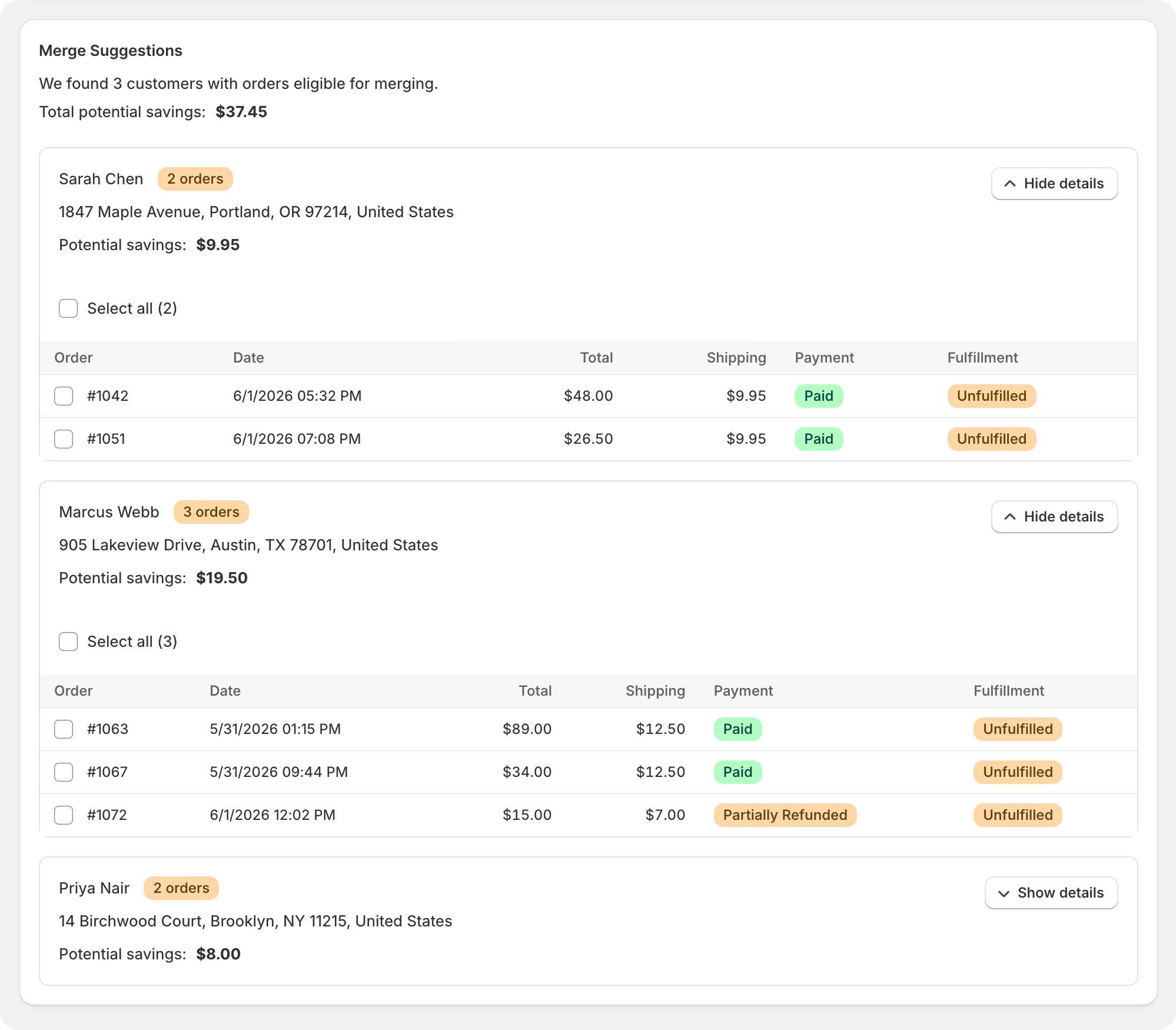
Because it merges before the boxes are packed, you capture the shipping savings instead of discovering the duplicate after both labels are printed.
"This app has saved us a ton on shipping cost! It makes our operations automated and efficient." — Upside Drinks
See how order merging works, or check the plans — there's even a free, merge-as-you-go option to start with.
Frequently asked questions
Can you combine orders on Shopify? Not with a native button — Shopify doesn't have one. You can combine orders manually by editing one and cancelling the other, or use an app that merges qualifying orders (and handles the refund and shipping reconciliation) automatically.
Does merging orders save on shipping? Yes. Combining two orders going to the same address into one shipment means one label and one box instead of two — a direct reduction in shipping and packing cost.
What happens to the tracking number when orders merge? The combined order ships as a single parcel with a single tracking number, so the customer follows one delivery instead of several.
Can I merge an old order with a new one? That depends on fulfillment status. If the earlier order hasn't shipped yet, it can usually be merged with a newer one; once an order is fulfilled, it's no longer a candidate. Merging works best before either order leaves the warehouse.
Why does a customer have duplicate orders? Usually a double-submit at checkout (a hung payment page and a second tap) or a quick second purchase. Catching these and merging them — or preventing the double-charge in the first place — keeps both your costs and your customer's confusion down.